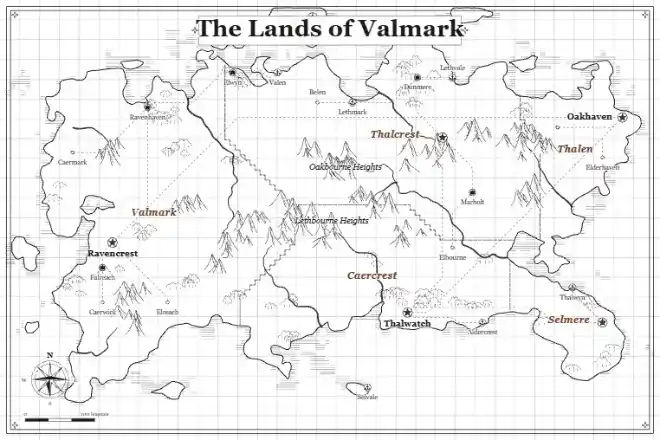
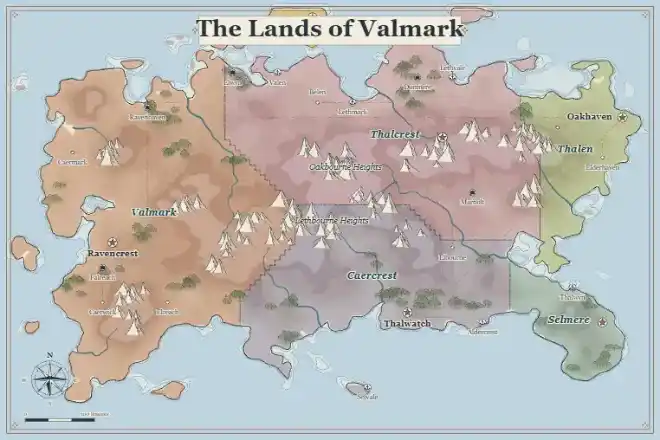
Built for Two-Minute D&D Regional Campaign Prep
Every Dungeon Master knows the moment when players ignore the prepared quest hook and decide to sail east across the bay twenty minutes before game time. Our free DnD map generator is built specifically for overland and regional campaign maps — opening directly onto a hand-drawn continent with kingdom borders and a tabletop travel grid pre-enabled, so you can go from blank slate to session-ready regional handout in under two minutes.
There is no login wall, no forced tutorial overlay, and no blank-canvas paralysis. Built on the same deterministic vector engine as our fantasy map maker, this DnD map generator lets you click Randomize until you see a coastline, mountain barrier, and river valley that fit your adventure arc, then drop castles, ports, towns, and ruins stamps directly onto the terrain.
Edit Faction Borders, Landmarks, and Dungeon Rumors Inline
A usable regional map needs to reflect your campaign's factions and hooks, not locked computer text. With Civika's DnD map generator:
- Rename any kingdom directly on the canvas: When Kingdoms are enabled, click any realm label to rename it for your campaign factions, duchies, or warring baronies.
- Place clean adventure stamps: Drop vector icons for Castles, Towns, Ports, Ruins, Camps, Mountains, and Forests onto the map, drag them into position, or remove them cleanly with full Undo / Redo history.
- Add custom place labels with readable typography: Click + Label to mark rumored dragon lairs, haunted marshes, or border forts, and style font, size, and ink color inline without obscuring the terrain.
- Keep your edits when switching styles: Prep your master DM version in warm Ink & Wash or Royal Atlas, then switch the DnD map generator to Print Ink for a crisp black-and-white player handout — every custom label, stamp, and renamed kingdom stays right where you put it.
D&D 5e Travel Scale and Virtual Tabletop (VTT) Setup
Whether your table plays with paper handouts or online in Roll20, Foundry VTT, or Owlbear Rodeo, scaling a regional chart consistently keeps exploration pacing clear:
- Choosing a regional travel scale: Use Island or Small canvases for local barony sandboxes (1 day's march = ~24 miles across a few grid squares or hexes), or Continent and Large canvases for kingdom-spanning campaigns where a cross-border trek takes a full tenday.
- 2x and 3x High-Res PNG / JPG for VTTs: Export crisp high-DPI images (up to 3600x2400 pixels) directly from this DnD map generator. Pick Hex or Square with dialed-down grid opacity if you want baked-in travel cells, or choose No Grid when you prefer Roll20 or Foundry's built-in alignment grid so tokens and rulers snap cleanly.
- Print-Ready Black & White Ink Mode: Switch the style dropdown to Print Ink for clean white paper, dark sepia-black linework, and classic coastal hatching that saves home printer ink and lets players scribble discoveries directly on the handout.
- Real Vector SVG Export: Need to import your campaign continent into Illustrator, Inkscape, or Figma for a printed zine or custom poster? Every coastline, river, mountain ridge, grid line, and label exports from the DnD map generator as true grouped vector paths.
Share Live Campaign Maps and Keep Separate DM & Player Versions
Instead of emailing outdated screenshots every time the party uncovers a hidden ruin, click Copy Share Link. Civika bundles your seed, style, grid, kingdom names, and placed landmarks into one reproducible URL so players open the exact same chart on desktop or mobile. You can also save two .civika.json project files from the same seed — one spoiler-free player chart and one DM master map packed with secret camps and faction notes — and re-import either version anytime inside the DnD map generator.
Looking for numbered wilderness travel cells? Switch to our Hex Map Generator preset with 0101 coordinates, or return to the main Fantasy Map Maker for full continent, island, and archipelago worldbuilding.
Mapmakers & DMs Discussion
0 notesNo notes yet. Drop your favorite map seed or tell us what biome or stamp you want next.